
Linking to apps in Android app stores – the Android Market Manager
 Linking to your Android app (or all of your apps) in the various Android app stores can be a bit of a hassle, since many app markets require a unique method to link to apps in their market.
Enter the Android Market Manager: this library encapsulates the linking methods for several of the big name app stores. It doesn’t cover all of the app stores covered in the Android Market Alternatives report, but it covers all of the big ones that I’ve made special efforts to link properly.
I’ve shown how to make and match the badges for various Android app stores, but this takes it up a notch – this is a complete library that you can drop into your project (it’s licensed with the Apache license 2.0!) to handle linking automatically.
Access the Android Market Manager source code
Head on over to GitHub to get the code:
https://github.com/TimMackenzie/AndroidMarketManager
Features of the Android Market Manager library
It may seem pretty simple (it’s not a lot of code, in fact), but it should make your job a bit simpler. The main exposed methods:
AMMLinks.marketShowAll
The marketShowAll method shows all apps by the selected developer. This is accomplished in different ways for different app stores.
AMMLinks.marketShowApp
The marketShowApp method shows a single app (not necessarily the current app). This could be useful for a few things, such as:
- Show an upgrade (premium) app
- Show the current app (e.g. to allow rating it)
- Show a companion app that users should install
AMMUtils.isDeviceKindleFire
Quite simply, this method lets you know if you’re currently running on a Kindle Fire. This is helpful if you want to implement different behaviors for this device.
Amazon’s offering is so popular (and a little different from other devices that can access the Amazon Appstore), it might make sense to add a bit of custom logic to make sure everything runs smoothly on this device.
What to do with it
Basically, the whole point is that you only need to know
- Which market you are operating under
- The developer name and IDs
- The IDs of this app
With this information, you can easily link to your app, another app, or all apps by a particular vendor.
Take a look at the included test app, which will demonstrate the market linking functionality. Beware, of course, that you need to run it on a platform that has access to the market you’re trying to test. Otherwise, you’ll get the manual search message.
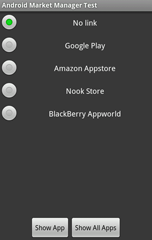
Hopefully the library and it’s use are clear (don’t forget to read the Javadoc). Let me know if you have questions.
Linking mechanisms
Going into the detail of the linking mechanisms is a post for another day. Right now, if you want to look at the code you can see the mechanics (and comments explaining them):
If you’re totally confused about all of these app markets for Android apps and don’t know where to start, take a look at the Android Market Alternatives report, which covers over 40 different Android app stores that you may want to pursue.